SiteSkite Lifetime Deal – Build and Manage WordPress Sites With AI
Managing WordPress sites takes a lot of time. Updates, backups, uptime checks, security scans — and you repeat it all for every site you own. When you manage five, ten, or fifty sites, the work never ends.
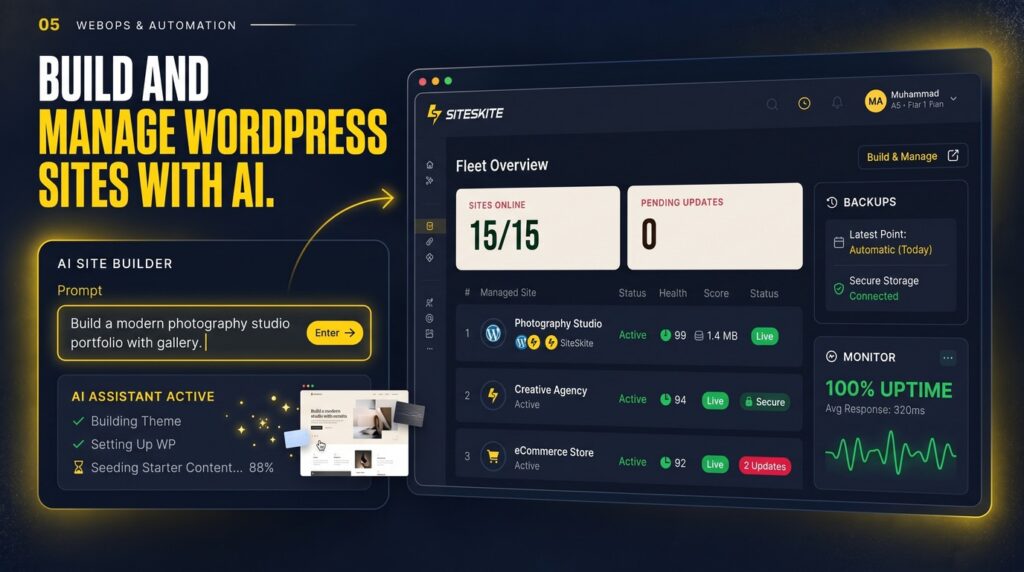
SiteSkite puts all of it in one dashboard. You can update plugins across many sites at once, back up and restore sites in a few clicks, and watch uptime and security from one place. It also has AI Site Studio, which builds a full WordPress site from a short text prompt. You describe the business, and SiteSkite plans, designs, and builds the site in a sandbox. Then you publish it to a live site in one click.
The SiteSkite lifetime deal starts at $29 once for lifetime access. There are four tiers, going up to $599. Every tier includes lifetime access and all future plan updates. The deal is rated 4.67 out of 5 from 6 reviews on AppSumo.
Core Features of SiteSkite Lifetime Deal
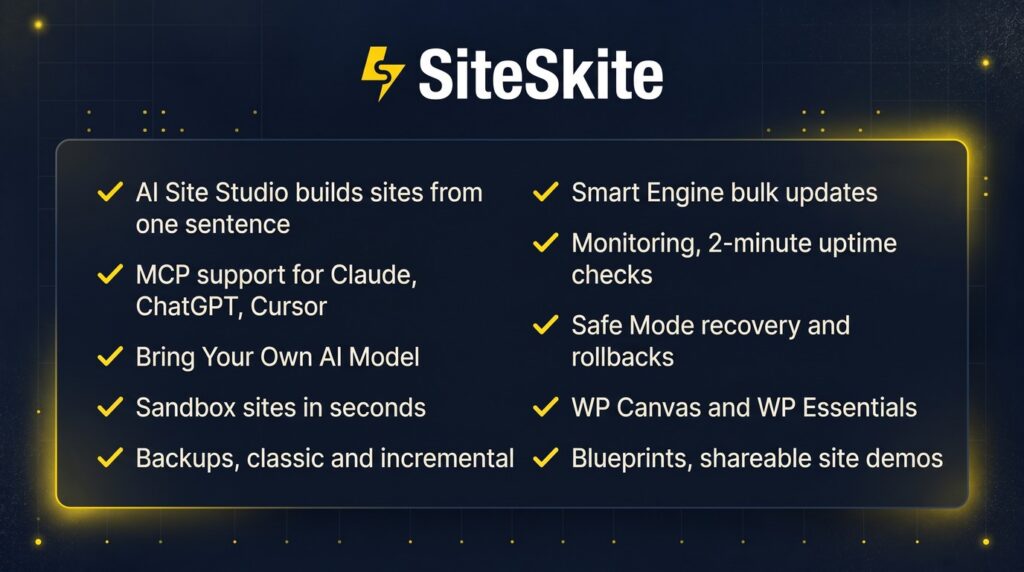
AI Site Studio
Describe a business in one sentence and SiteSkite builds a full WordPress site for it. It plans the pages, designs the layout, and builds a responsive site in an AI sandbox. You can refine it in Feedback mode, then publish it to a connected WordPress site in one click or download it as a portable ZIP. It works best with strong models like Claude 4.6+, Gemini 3+, Kimi 2.6+, and GPT 5.5+. There are 155 jumpstarts to start from.
One Dashboard for Every WordPress Site
You manage, monitor, and back up all your WordPress sites from one place. No more logging into each site one by one. You get a 1-click login to any connected site’s wp-admin, and you can manage WordPress users across sites without sharing your SiteSkite login.
Backups and One-Click Recovery
SiteSkite runs on-demand, daily, and weekly backups. You can restore a site from a backup, roll back a bad plugin or theme update, and use Safe Mode to get back into wp-admin after a fatal error without FTP access. You can also bring your own cloud storage — Google Drive, Dropbox, Backblaze B2, pCloud, or AWS S3.
Smart Engine Bulk Updates
Update, roll back, add, or delete plugins and themes across many sites in one go. This is the feature that saves the most time for people who manage client sites. One click updates the same plugin on ten sites instead of ten separate logins.
Monitoring and Security Checks
SiteSkite checks uptime every 2 minutes. It also watches for vulnerabilities, checks SSL certificates and domain expiry, and measures PageSpeed and Core Web Vitals. You get alerts by email and Slack, and you can see Google Search Console and Google Analytics data next to the updates that moved them.
MCP Support and Bring Your Own AI Model
SiteSkite works as the operational layer for Claude, ChatGPT, and Cursor through MCP. You can manage your sites from your AI assistant. On Growth and above, you can also connect your own LLM API keys — OpenAI, Anthropic, Gemini, DeepSeek, Kimi, GLM, OpenRouter, Hermes, or a custom OpenAI-compatible gateway.
Pros of SiteSkite
- One dashboard for all your sites: Updates, backups, monitoring, and user management live in one place.
- AI site builder included: AI Site Studio builds a full WordPress site from a short prompt, starting at the Growth tier.
- Real backup and recovery tools: Classic and incremental backups, rollback, Safe Mode, and your own cloud storage.
- Bulk updates save hours: Smart Engine updates plugins and themes across many sites at once.
- One-time payment: You pay once and keep lifetime access, with all future plan updates included.
- 60-day refund: You get 60 days to try it and ask for your money back if it does not fit.
- Bring your own AI keys: On Growth and above, you can use your own LLM accounts instead of only SiteSkite credits.
Cons of SiteSkite
- No AI Site Studio on Tier 1: The $29 tier has no AI site builder and no Bring Your Own AI Model. The builder starts at Growth ($139).
- AI credits do not roll over: Unused monthly AI credits expire at the end of the month.
- AI Site Studio builds Gutenberg sites only: It does not generate Elementor sites or convert its output to Elementor.
- Migration overwrites the whole site: Moving a redesigned site back to production transfers the entire site, including plugins and database. It does not merge only the design changes.
- Thin buyer proof so far: Only 6 AppSumo reviews and 22 purchases at the time of writing, so long-term proof is still limited.
- Backups can struggle on some hosts: One reviewer reported a full backup that kept stopping at 13% on a restrictive host. Test backups early on the hosts you use most.
- Not covered by We Got Your Back: This is a Launchpad listing, so AppSumo’s extra guarantee does not apply. The 60-day refund still stands.
Who is SiteSkite best for?
- Freelancers and small agencies: Manage many client sites from one dashboard and send branded reports.
- WordPress maintenance providers: Bulk updates, backups, and monitoring are the core of a care plan.
- Site owners with several sites: If you run 5, 10, or more WordPress sites, the time saved adds up fast.
- AI-curious builders: AI Site Studio turns a short prompt into a full site you can refine and publish.
- Small teams: Roles for Admin, Team Member, and Client mean nobody needs to share one login.
SiteSkite AppSumo Pricing Plan
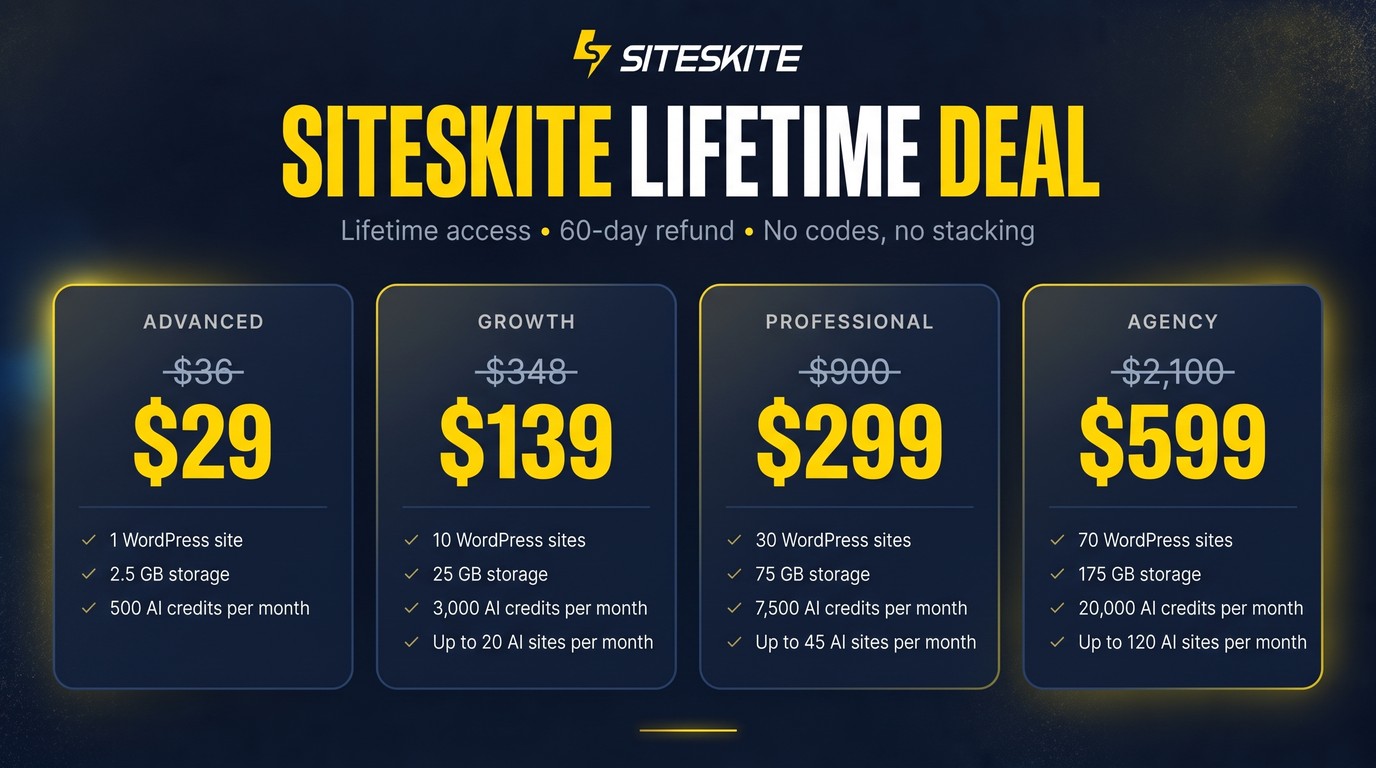
There are four license tiers. There are no codes and no stacking — you just choose a plan. You can upgrade or downgrade between tiers. Every tier includes lifetime access to SiteSkite and all future plan updates. You must activate within 60 days of purchase.
License Tier 1 — $29
- 1 connected website
- 2.5 GB SiteSkite-managed storage
- 500 monthly AI credits
- 3 blueprints
- MCP access
- 2-minute uptime monitor
- Reports and notifications
- Google Search Console and Google Analytics (GA4) support
- Pretty Logs and Safe Mode
- Rollback for updates and Marketplace access
- Backups (classic and incremental) and Bring Your Own Cloud Storage
- Vulnerability monitoring and BirdEye monitor
- Performance PageInsights and Smart Engine
- Sandbox sites and production/staging pairs
- Migrate to another host (clone from backup)
- WP User Management, Team and Client Access
- WP Canvas and WP Essentials
- Smart Engine bulk updates
- 1-click admin login
- White-label reports
- No AI Site Studio and no Bring Your Own AI Model on this tier
License Tier 2 — $139
Includes everything in License Tier 1, plus:
- 10 connected websites (up from 1)
- 25 GB SiteSkite-managed storage (up from 2.5 GB)
- 3,000 monthly AI credits (up from 500)
- 5 blueprints (up from 3)
- Up to 20 AI Sites per month with AI Site Studio
- Bring Your Own AI Model — connect your own LLM API keys
License Tier 3 — $299
Includes everything in License Tier 2, plus:
- 30 connected websites (up from 10)
- 75 GB SiteSkite-managed storage (up from 25 GB)
- 7,500 monthly AI credits (up from 3,000)
- 10 blueprints (up from 5)
- Up to 45 AI Sites per month (up from 20)
- White Label Plugin — your agency name and logo in wp-admin, plus Stealth Mode
- Custom Domains — send client reports from your own email domain and run demos on your own domain
License Tier 4 — $599
Includes everything in License Tier 3, plus:
- 70 connected websites (up from 30)
- 175 GB SiteSkite-managed storage (up from 75 GB)
- 20,000 monthly AI credits (up from 7,500)
- 20 blueprints (up from 10)
- Up to 120 AI Sites per month (up from 45)
The list price shown on AppSumo is $36 for Tier 1, $348 for Tier 2, $900 for Tier 3, and $2,100 for Tier 4. I am not presenting calculated discount percentages beyond what AppSumo shows.
How to Get an Extra 10% OFF On SiteSkite Lifetime Deal?

- Follow the instructions and get the extra benefit of 10% OFF 😉
- Go to this link AppSumo and get 10% OFF
- You will see a pop-up form comes for unlocking a 10% discount
- Provide your email there and claim your discount
- Note: This is available for first-time purchases only
5 Best SiteSkite Alternatives 2026
These tools manage WordPress sites too. None of them builds sites with AI the way SiteSkite does.
SiteSkite vs MainWP
MainWP is a free, open-source, self-hosted dashboard for managing unlimited WordPress sites. You install it on your own WordPress site and run it yourself.
- Starting price: Free core. Pro is $29/month or $199/year.
- Main advantages: Free core with unlimited sites, open source, and a large extension library.
- Main limitation: You host and maintain the dashboard yourself, and there is no AI site generation.
- Difference from SiteSkite: MainWP is self-hosted and free to start, while SiteSkite is a hosted cloud platform with an AI site builder and MCP support.
SiteSkite vs ManageWP
ManageWP is a free cloud dashboard for unlimited WordPress sites, with premium features sold as per-site add-ons.
- Starting price: Free core. Premium add-ons from $1/site/month. A bundle for up to 100 sites is $150/month.
- Main advantages: Free core, simple setup, and you only pay for the add-ons you need.
- Main limitation: Per-site add-on pricing gets expensive at scale, and there is no AI site builder.
- Difference from SiteSkite: ManageWP charges per site per month for premium features, while SiteSkite charges once for lifetime access.
SiteSkite vs WP Umbrella
WP Umbrella is a cloud dashboard for WordPress maintenance with all features included in one flat per-site price.
- Starting price: €1.99/site/month.
- Main advantages: Simple pricing with everything included, and a clean, fast dashboard.
- Main limitation: No AI site generation and no MCP or Bring Your Own AI angle.
- Difference from SiteSkite: WP Umbrella is a monthly per-site subscription, while SiteSkite is a one-time lifetime deal with an AI builder.
SiteSkite vs Modular DS
Modular DS is a cloud dashboard for managing WordPress sites, with client reports and white-label options.
- Starting price: Freelance from $16/month for up to 10 sites. Starter is $34/month billed yearly.
- Main advantages: Cloud dashboard with fixed plan pricing and good client reporting.
- Main limitation: No AI site builder, and the per-plan pricing grows as you add sites.
- Difference from SiteSkite: Modular DS is a monthly subscription for site management only, while SiteSkite adds AI site generation, MCP, and lifetime pricing.
SiteSkite vs InfiniteWP
InfiniteWP is a free, self-hosted dashboard for managing WordPress sites, with paid add-ons for backups, staging, and more.
- Starting price: Free core. Paid add-ons from $147/year.
- Main advantages: Free core, self-hosted, and a modular add-on system.
- Main limitation: Self-hosted setup, slower development pace, and no AI features.
- Difference from SiteSkite: InfiniteWP is a self-hosted tool with annual add-on licensing, while SiteSkite is a hosted platform with AI features and a one-time payment.
Which SiteSkite alternative fits best?
Pick MainWP if you want a free, self-hosted dashboard and you are happy to run it yourself. Pick ManageWP if you want a free cloud dashboard and only a few premium add-ons. Pick WP Umbrella if you want simple flat per-site pricing with everything included. Pick Modular DS if you want a polished cloud dashboard with client reports. Pick InfiniteWP if you want a free self-hosted tool and do not need AI. Pick SiteSkite if you want one dashboard plus an AI site builder, MCP support, and a one-time lifetime price.
Final Thoughts – SiteSkite Review 2026
What I like most about SiteSkite is how much of the boring WordPress work it takes off your plate. Bulk updates, backups, uptime checks, and security monitoring all live in one dashboard. And AI Site Studio is genuinely useful — describe a business, get a full site, refine it, and publish it. For freelancers and small agencies, that combination is hard to ignore.
The limits matter too. Tier 1 has no AI Site Studio, so the builder starts at $139. AI credits do not roll over, and the refund covers 60 days. And with only 6 AppSumo reviews so far, buyer proof is still thin.
At $29 once for lifetime access, the SiteSkite lifetime deal is worth it if you manage more than one WordPress site. The real value starts at Growth ($139), where the AI site builder and Bring Your Own AI Model unlock. If you manage client sites for a living, that tier pays for itself fast.