AI help usually means stopping what you are doing. You leave your chat or email, open a separate AI app, paste your text in, wait, copy the answer, and paste it back. Do that twenty times a day and the “time-saving” tool starts costing you time.
Acti fixes this by putting the AI inside the keyboard itself. It is an agentic keyboard for iOS and Android, plus a desktop assistant for Mac. I type or say what I need right where I am working, hold the space bar to open the Acti Wheel, and Acti AI answers — or a saved Act runs the whole task for me, like creating a meeting link or saving a note, without switching apps.
The Acti lifetime deal starts at $59 once for lifetime access, against a $299 list price. Every tier includes the full product. Higher tiers only raise the monthly AI credit allowance, from 1,000 credits up to 30,000.
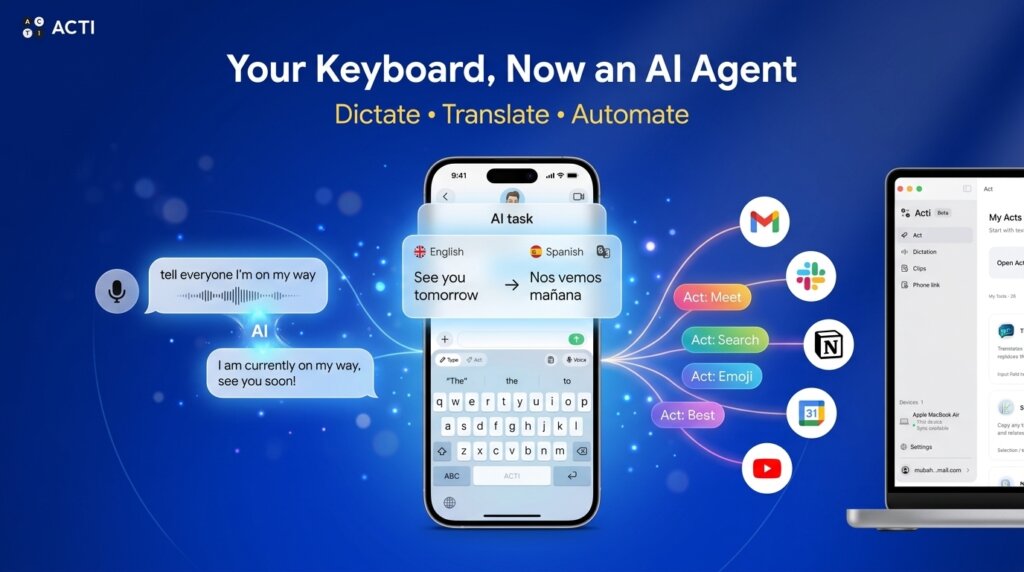
Core Features of Acti Lifetime Deal
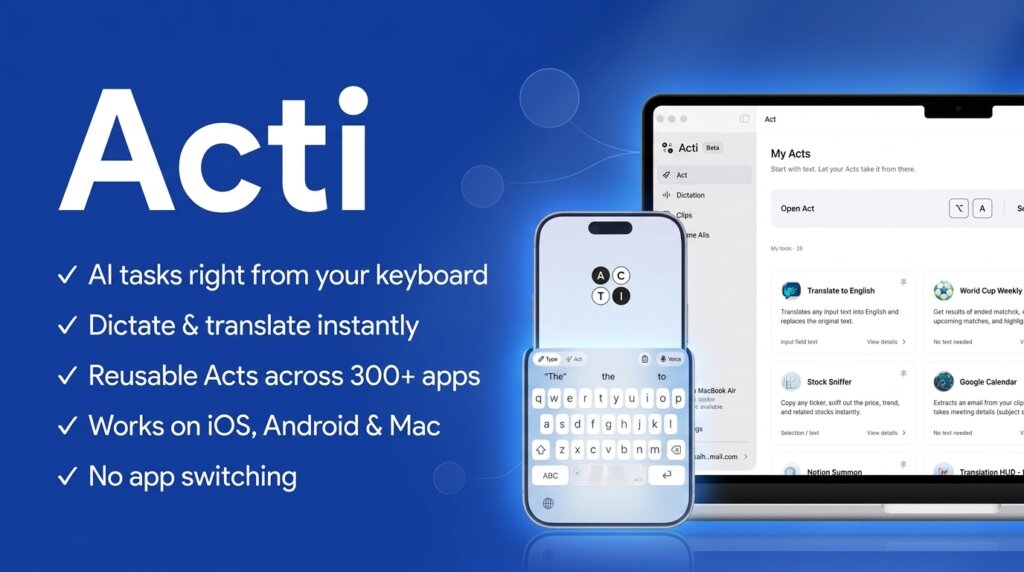
Acti AI and the Acti Wheel
Acti AI is the context-aware assistant built into the keyboard. I type what I need — a restaurant idea, the weather, a better reply — and hold the space bar to open the Acti Wheel. I slide to Acti AI, let go, and the result appears right on the keyboard. I can check it before it goes into my message. No app switching, no copy and paste.
Acts — Reusable Workflows
An Act is a reusable workflow for a task I repeat. Instead of typing the same instructions every day, I run the Act and it does the job: reformatting text, creating a meeting link, saving something to Notion. Acts range from simple text transformations to multi-step workflows that use connected apps and APIs. For me, this is what separates Acti from a normal AI keyboard.
Act Builder Agent
I do not need to build my Acts from scratch, and I do not need code. With Act Builder Agent, I describe what I want in plain words. The agent turns it into a plan, I refine it through conversation, test it, and save it as my own Act. A personal grammar checker, a translation routine, a multi-step posting workflow — I describe it, the agent builds it.
5,000+ Ready-Made Acts
If building sounds like work, the Acti Community already has more than 5,000 ready-made Acts. I browse, tap Add, and the Act sits in my keyboard panel ready to run. I can also copy an existing Act and adjust it to fit my needs, and keep my own Acts private or share them with others.
300+ App and API Connections
Acti connects to more than 300 apps and APIs, including Gmail, Slack, Notion, and Google Calendar. That is how an Act can save text to Notion or create a calendar event instead of just producing text. Built-in tools for weather, maps, and sports need no setup at all. And Acti asks for my approval before it takes action in a linked app, so nothing happens behind my back.
Voice Dictation and Translation
Speaking is often faster than typing. Acti turns speech into text with AI cleanup, and voice commands can run an Act or rewrite text without typing at all. Voice Translate goes one step further: I speak in one language and get clean text in another, with support for more than 100 languages. Dictation alone covers 60+ languages, which makes this genuinely useful for multilingual chats.
Acti Desktop and Clips
The deal also includes Acti Pro Desktop for Mac. I select text in any app and ask Acti AI to rewrite, translate, or explain it, or I dictate instead of typing. I can even use my phone as the desktop microphone. My Acts and Clips sync across devices, and Clips — my saved, frequently used text snippets plus a clipboard history of copied text and links — follow me from phone to Mac.
Pros of Acti
- No app switching: answers and actions happen inside the app I am already using.
- Real actions, not just text: Acts can create meeting links, save notes, and work across 300+ connected apps and APIs.
- Build without code: Act Builder Agent turns a plain-language description into a working, reusable Act.
- Huge head start: 5,000+ ready-made Acts from the community, ready to add in one tap.
- Strong voice tools: dictation, voice commands, and voice translation in 100+ languages.
- Phone and Mac together: unlimited devices, with Acts and Clips synced across mobile and desktop.
- Control and privacy: Acti asks for approval before acting in linked apps, and everyday typing is not recorded or sent to its servers.
- Simple pricing: every tier has all features — higher tiers only add more monthly AI credits.
Cons of Acti
- Monthly credit cap: AI features run on monthly credits (1,000 on Tier 1), and unused credits do not roll over. Heavy users can run out mid-month.
- Typing still maturing: AppSumo reviewers mention occasional sluggishness when typing fast, and swipe typing and the key layout are still works in progress.
- Windows desktop in early beta: Acti Desktop for Windows is now in early beta for Acti Pro members, so some features may still be incomplete.
- No BYOK: I cannot plug in my own AI API keys or choose the model provider — Acti manages the models for me.
- Actions depend on support: some tasks only work with certain apps, APIs, or account permissions, and features differ between iOS, Android, and Mac.
- Very new product: the AppSumo rating is a strong 4.82, but it comes from only 17 reviews so far, so the track record is short.
Who is Acti best for?
- Content creators: draft posts, write replies, and polish captions without leaving the app you are posting in.
- Marketers and support reps: fix tone, rewrite messages, and reuse saved replies through Clips all day long.
- Solopreneurs and founders: create meeting links, add calendar events, and save notes to Notion from the keyboard.
- Multilingual users: dictate in one language and send clean text in another with Voice Translate.
- Frequent travelers: check flights, find places, and translate on the go without juggling apps.
- Remote workers on Mac and phone: keep the same Acts and Clips flowing across desktop and mobile.
Acti AppSumo Pricing Plan
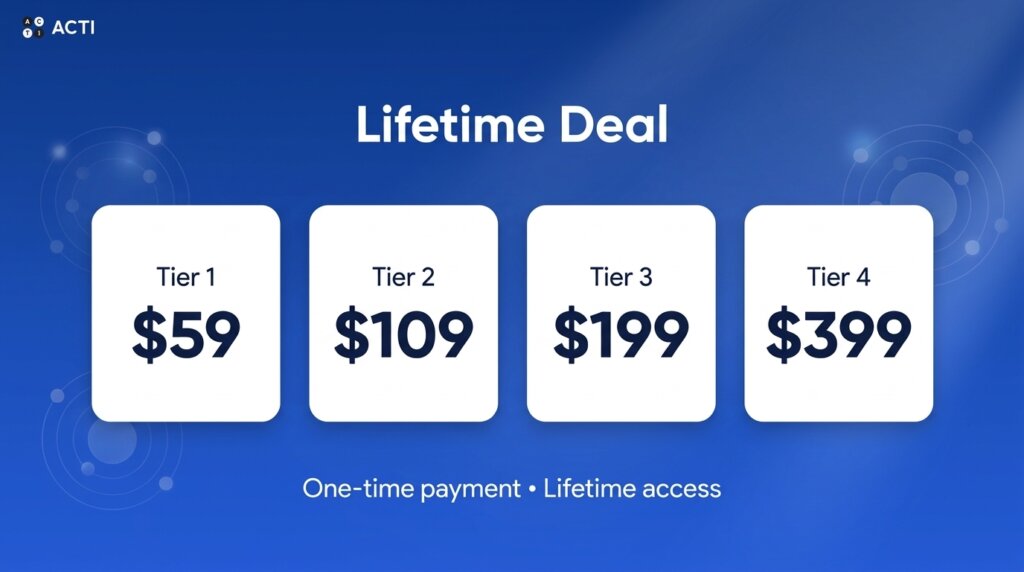
License Tier 1 — $59
- 1,000 AI credits per month
- List price: $299
- Lifetime access to Acti
- Use on unlimited devices
- Connect to 300+ apps and APIs
- Choose from 5,000+ ready-made Acts
- Create custom Acts with AI (Act Builder Agent)
- Turn speech into text with AI
- Run tasks using voice commands
- Translate speech in 100+ languages
- Acti Pro Desktop (Mac) included
- Sync Acts across devices
- Use your phone as a desktop microphone
- Save frequently used text as Clips shortcuts
- Sync Clips across devices
- Store copied text and links (clipboard history)
- Acti mobile keyboard (iOS and Android)
- 60-day money-back guarantee
License Tier 2 — $109
Includes everything in License Tier 1, plus:
- 3,000 AI credits per month instead of 1,000
- List price: $599
License Tier 3 — $199
Includes everything in License Tier 1, plus:
- 10,000 AI credits per month instead of 1,000
- List price: $999
License Tier 4 — $399
Includes everything in License Tier 1, plus:
- 30,000 AI credits per month instead of 1,000
- List price: $1,999
The tiers are simple: the product is identical, and only the monthly credit allowance grows. Most solo users will live comfortably on Tier 1 or 2. Check the live listing for the Acti lifetime deal before buying, since AppSumo deals can change.
How to Get an Extra 10% OFF On Acti Lifetime Deal?

- Follow the instructions and get the extra benefit of 10% OFF 😉
- Go to this link AppSumo and get 10% OFF
- You will see a pop-up form comes for unlocking a 10% discount
- Provide your email there and claim your discount
- Note: This is available for first-time purchases only
5 Best Acti Alternatives 2026
If Acti is not the right fit, here are the closest alternatives I know.
Acti vs Typewise
Typewise is a privacy-first keyboard with a unique hexagonal key layout designed to cut typos, with processing kept on-device.
- Starting price: Free plan; PRO at $1.99/month, $9.49/year, or $25 one-time for lifetime
- Main advantages: strong privacy, almost no data collection, fewer typing errors by design
- Main limitation: it only improves typing — no AI agent, no actions, no connections to your other apps
- Difference from Acti: Typewise makes typing itself better; Acti uses the keyboard to get tasks done across your apps
Acti vs Grammarly
Grammarly is the best-known writing assistant. Its keyboard and apps check grammar, tone, and clarity, and its generative AI rewrites text for you.
- Starting price: Free plan; Pro at $12/month billed annually ($30/month billed monthly)
- Main advantages: best-in-class writing polish, tone detection, plagiarism checking, works almost everywhere
- Main limitation: writing quality only — it cannot run tasks in other apps, and Pro caps generative AI at 2,000 prompts a month
- Difference from Acti: Grammarly improves the text you write; Acti acts on what you ask, beyond the text itself
Acti vs Microsoft SwiftKey
SwiftKey is Microsoft’s free AI keyboard, known for fast swipe typing, smart predictions, a strong clipboard, and built-in Copilot AI features.
- Starting price: Free
- Main advantages: polished and fast, learns your style, syncs across devices, costs nothing
- Main limitation: no custom automations or agentic workflows, and it ties you to the Microsoft ecosystem
- Difference from Acti: SwiftKey is a smarter traditional keyboard; Acti is a command layer that executes tasks
Acti vs Gboard
Gboard is Google’s free keyboard, preinstalled on most Android phones, with Google Search, Translate, and voice typing built in.
- Starting price: Free
- Main advantages: instant search and translation while typing, excellent voice typing, zero setup for most Android users
- Main limitation: no AI agent that completes multi-step tasks or connects your apps and accounts together
- Difference from Acti: Gboard finds things while you type; Acti finishes the task for you
Acti vs Wispr Flow
Wispr Flow is a voice-first dictation app for Mac, Windows, iOS, and Android that turns speech into clean, formatted text in any app.
- Starting price: Free plan (2,000 words/week on desktop); Pro at $15/month or $12/month billed annually
- Main advantages: excellent dictation accuracy and cleanup, works on Windows too, great for long-form writing by voice
- Main limitation: dictation only — no keyboard agent, no reusable workflows, and it is subscription-only with no lifetime option
- Difference from Acti: Wispr Flow turns your voice into polished text; Acti turns typed or spoken intent into completed actions
Which Acti alternative fits best?
Pick Typewise if privacy and typo-free typing matter more than AI features. Pick Grammarly if your only goal is cleaner, more professional writing. Pick SwiftKey or Gboard if you want a great free keyboard and nothing more. Pick Wispr Flow if you mainly dictate long texts and need Windows support. Pick Acti if you want your keyboard to actually do things — answer, translate, save, schedule, and automate — for one $59 payment.
Final Thoughts – Acti Review 2026
What I like most about Acti is the idea itself: the keyboard is where every conversation already starts, so it is the smartest place to put an AI agent. Instead of visiting an AI app all day, I hold the space bar and get the answer or the action right where I am typing.
The features that matter most to me are the reusable Acts, the Act Builder Agent that creates them from plain language, and the 300+ app connections that let those Acts finish real tasks. The voice translation in 100+ languages and the Mac desktop sync make it feel like one tool across my whole day, not just a phone gimmick.
At $59 once, against a $299 list price, the Acti lifetime deal is an easy recommendation for anyone who types and repeats the same small tasks all day. The honest risks are the monthly credit caps and the fact that Acti is still young — but the 60-day money-back guarantee gives me two full months to find out if it fits my workflow.