Building a Chrome extension used to mean learning JavaScript first. You also had to understand manifests, permissions, and popup files. For a small idea, that was a lot of work.
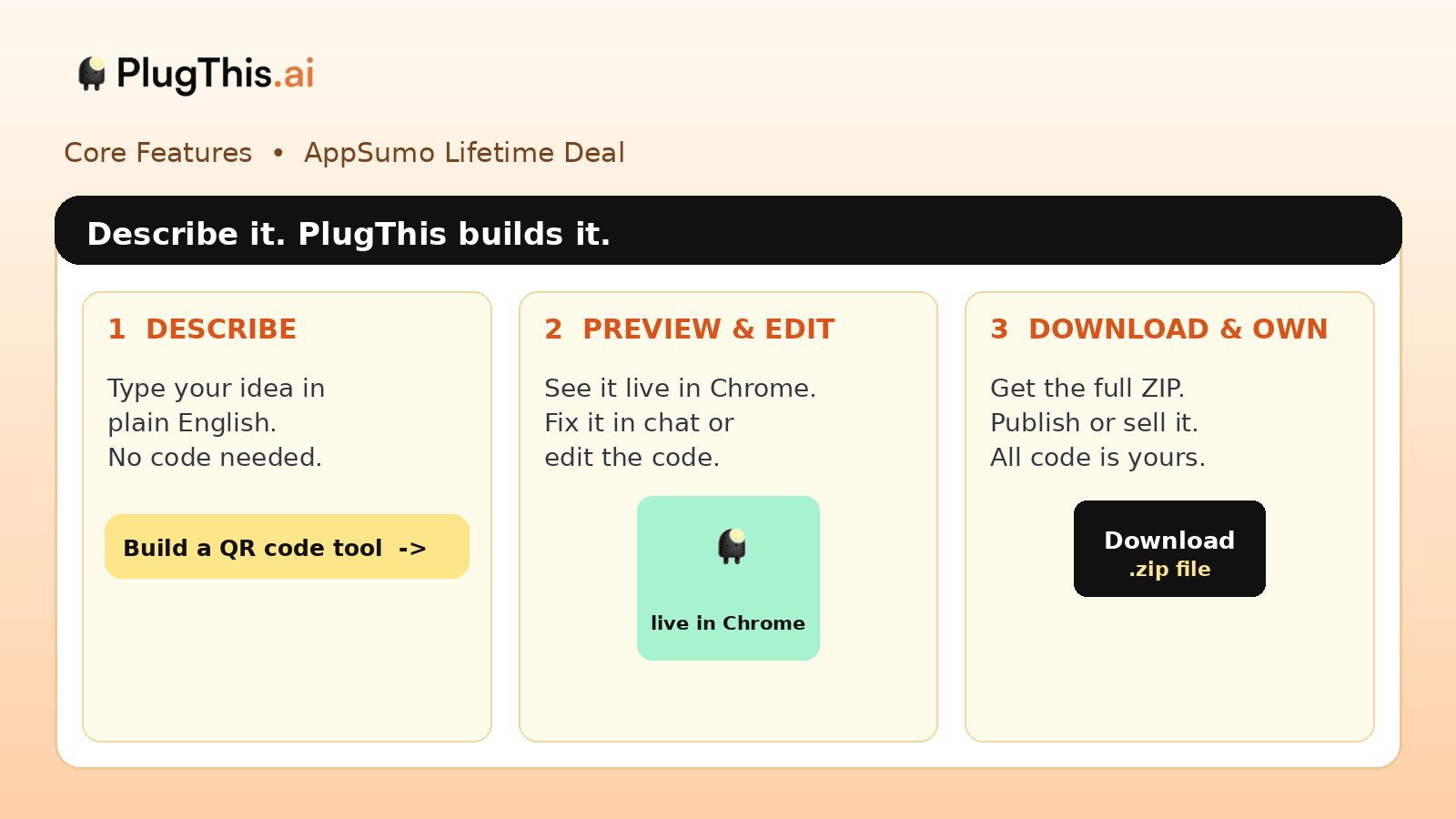
PlugThis AI changes that first step. I describe the extension in plain English. It builds a working Manifest V3 extension that I can test in Chrome. If I want a change, I ask in chat and it rebuilds.
The PlugThis AI Lifetime Deal starts at $39 on AppSumo. It comes with lifetime access. Higher tiers give you more extensions, more monthly generations, and more seats and workspaces. For me, the main benefit is simple. I can turn small browser ideas into real tools without hiring a developer.

Core Features of PlugThis AI Lifetime Deal
Plain-English extension builder
You write what the extension should do in normal words. PlugThis AI then creates the full extension package. You do not need to know JavaScript or Chrome APIs to start.
Real Manifest V3 output
Each build gives you the files Chrome needs. That includes the manifest, content scripts, popup, icons, and background service worker. You can load it in Chrome or publish it to the Chrome Web Store.
Chat editing and live preview
You can improve the extension by chatting with the builder. You can also see a live preview as you work. If you know code, you can edit the files in the built-in editor.
Version history and GitHub sync
PlugThis AI keeps a plain-English change history. You can restore an older version if a change goes wrong. GitHub sync also helps you keep your code safe outside the tool.
Supabase backend and API keys
Some extensions need login, storage, or a database. PlugThis AI can connect a Supabase backend for that. For AI features inside your extension, you use your own OpenAI, Anthropic, Gemini, or Groq key.
Own, publish, and sell your code
You get all the code for what you build. You can download it as a ZIP file. You can also publish it, sell it, or build extensions for clients under your own name.
Pros of PlugThis AI
- No Coding Needed to Start: You can build a working extension from a plain-English prompt.
- Real Extension, Not a Demo: The output is an installable Manifest V3 package, not just a preview image.
- Fast First Version: Simple tools can be ready in minutes, then improved step by step.
- Full Code Ownership: You can download, edit, publish, or sell the code you create.
- Good for Client Work: Freelancers and small teams can build custom browser tools for clients.
- Backend When You Need It: Supabase support adds login, database, and storage without server coding.
- Helpful Iteration: Chat changes, live preview, and version history make fixes easier.
Cons of PlugThis AI
- Monthly Generation Limits: AppSumo tiers cap how many generations you get each month.
- Complex Builds Need Iteration: Bigger or unusual extensions may take several rounds to get right.
- Your Own AI Keys for Extension Features: If your extension uses AI, you pay for that API use yourself.
- Chrome Store Still Has a Fee: Publishing needs a Google developer account, which costs $5 one time.
- Chrome Only: This tool is made for Chrome extensions, not full web or mobile apps.
Who is PlugThis AI best for?
- Solopreneurs: They can automate small browser tasks without hiring a developer.
- Content Creators: They can build simple tools for research, saving, and daily browser work.
- Freelancers: They can create custom Chrome extensions for clients and charge for the work.
- Small Teams: They can build internal tools that sit inside the browser they already use.
- Developers: They can get a fast starting point, then edit the full code themselves.
PlugThis AI AppSumo Pricing Plan
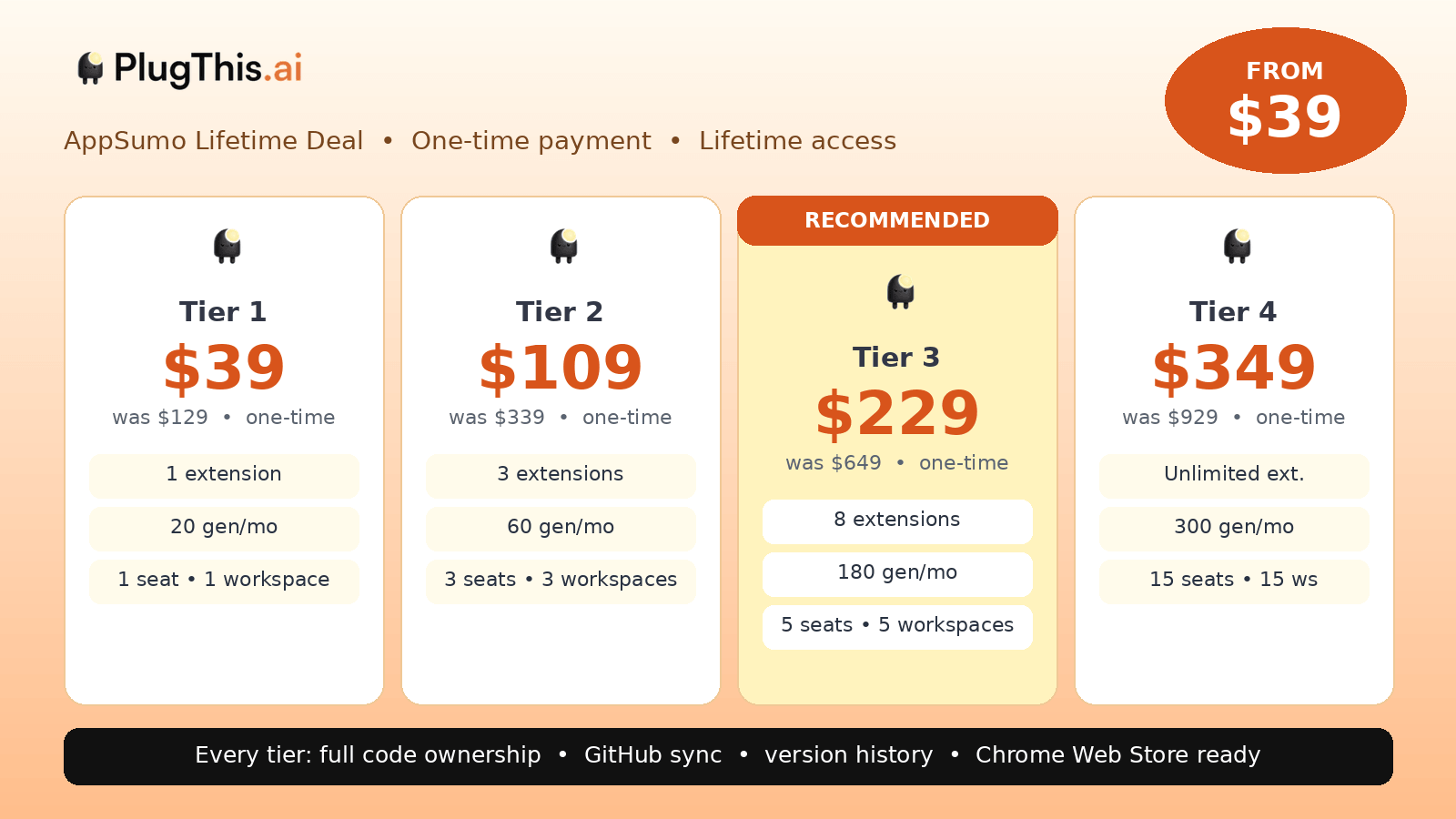
License Tier 1 — $39
Features:
- 1 extension
- 20 generations each month
- 1 seat
- 1 workspace
- Discover library access
- Chrome Web Store readiness
- Full-stack builds
- GitHub sync and version history
- Public share links
- Own all code
License Tier 2 — $109
Includes everything in License Tier 1, plus:
- 3 extensions
- 60 generations each month
- 3 seats
- 3 workspaces
License Tier 3 — $229
Includes everything in License Tier 2, plus:
- 8 extensions
- 180 generations each month
- 5 seats
- 5 workspaces
License Tier 4 — $349
Includes everything in License Tier 3, plus:
- Unlimited extensions
- 300 generations each month
- 15 seats
- 15 workspaces
How to Get an Extra 10% OFF On PlugThis AI Lifetime Deal?

- Follow the instructions and get the extra benefit of 10% OFF 😉
- Go to this link AppSumo and get 10% OFF
- You will see a pop-up form comes for unlocking a 10% discount
- Provide your email there and claim your discount
- Note: This is available for first-time purchases only
5 Best PlugThis AI Alternatives 2026
If you want a PlugThis AI alternative, these five tools are worth looking at. Each one builds digital products, but the main focus is different.
PlugThis AI vs Lovable
Lovable is made for building full web apps from prompts. It focuses on websites and SaaS products, not browser extensions.
- Starting price: Free; Pro starts at $25/month.
- Main advantages: Fast web app building, clean design, database, and hosting support.
- Main limitation: It is not built for Manifest V3 Chrome extensions.
- Difference from PlugThis AI: Lovable builds web apps. PlugThis AI builds Chrome extensions only.
PlugThis AI vs Replit
Replit is a cloud coding platform with an AI agent and a full editor. It can run many types of software projects.
- Starting price: Free; Core starts at about $20/month.
- Main advantages: Real coding environment, many languages, hosting, and strong developer control.
- Main limitation: It is broader and more technical than a simple extension builder.
- Difference from PlugThis AI: Replit is a general coding platform. PlugThis AI is focused only on Chrome extensions.
PlugThis AI vs Bolt
Bolt is a prompt-based app builder that works in the browser. It is popular for fast prototypes and web demos.
- Starting price: Free; Pro starts at $25/month.
- Main advantages: Very fast prompt-to-preview flow and no local setup.
- Main limitation: Its output is aimed at web apps, not Chrome extension packages.
- Difference from PlugThis AI: Bolt is best for quick web prototypes. PlugThis AI gives you an installable Chrome extension.
PlugThis AI vs v0
v0 is a UI builder from the Vercel ecosystem. It is strong for clean React interfaces and frontend parts.
- Starting price: Free; Premium starts at about $20/month.
- Main advantages: Clean UI output, React components, and smooth Vercel workflow.
- Main limitation: It does not handle the full Chrome extension structure by itself.
- Difference from PlugThis AI: v0 focuses on interface design. PlugThis AI builds the whole extension package.
PlugThis AI vs Emergent
Emergent is an AI app builder for creating broader software products. It aims at full apps rather than one browser tool.
- Starting price: Standard starts at about $20/month.
- Main advantages: Full app building, broader product scope, and multi-step product creation.
- Main limitation: That broader scope can be more than you need for a small browser tool.
- Difference from PlugThis AI: Emergent builds general apps. PlugThis AI keeps the job small and Chrome-focused.
Which PlugThis AI alternative fits best?
Choose Lovable for a full web app. Replit is better if you want a real coding workspace. Bolt fits fast web prototypes. v0 works well for polished UI parts. Emergent is better for broader app ideas. Pick PlugThis AI when the thing you want is a Chrome extension.
Final Thoughts – PlugThis AI Review 2026
What I like most about PlugThis AI is its narrow focus. It does one job: turning an idea into a Chrome extension. That focus makes the process feel simple.
The chat editing, live preview, code editor, and version history also help. I can start with no code, then improve the tool step by step. If I need login or storage, the Supabase option is there too.
The PlugThis AI Lifetime Deal gives you lifetime access with higher limits on each tier. For me, its main value is simple: I can build, own, and even sell small browser tools without starting from code.